Why Mobile Business Valuation Matters for Founders
For bootstrapped SaaS founders and indie coders, time and context are always in short supply. Business valuation is not just about preparing for an exit or fundraising—it’s a tool for understanding your company’s operating strengths and weaknesses. Mobile valuation apps, like EvalyMe’s iOS and Android offerings, make it possible to run quick, scenario-based estimates wherever you are. This immediacy is especially useful for founders who are juggling product, support, and growth tasks, or who want to sanity-check their assumptions before making a major decision.
Unlike desktop-only tools, mobile valuation apps let you capture real-time changes in your metrics, test different growth or churn scenarios, and see how those changes affect your estimated range. This is not a substitute for a formal appraisal, but it is a practical way to pressure-test your business model and prioritize your next actions. Since EvalyMe’s calculator is available both in-browser and via mobile apps, founders can start an estimate without sign-up and later sync their scenarios into a private workspace for ongoing planning.
How Mobile Valuation Apps Work: The EvalyMe Workflow
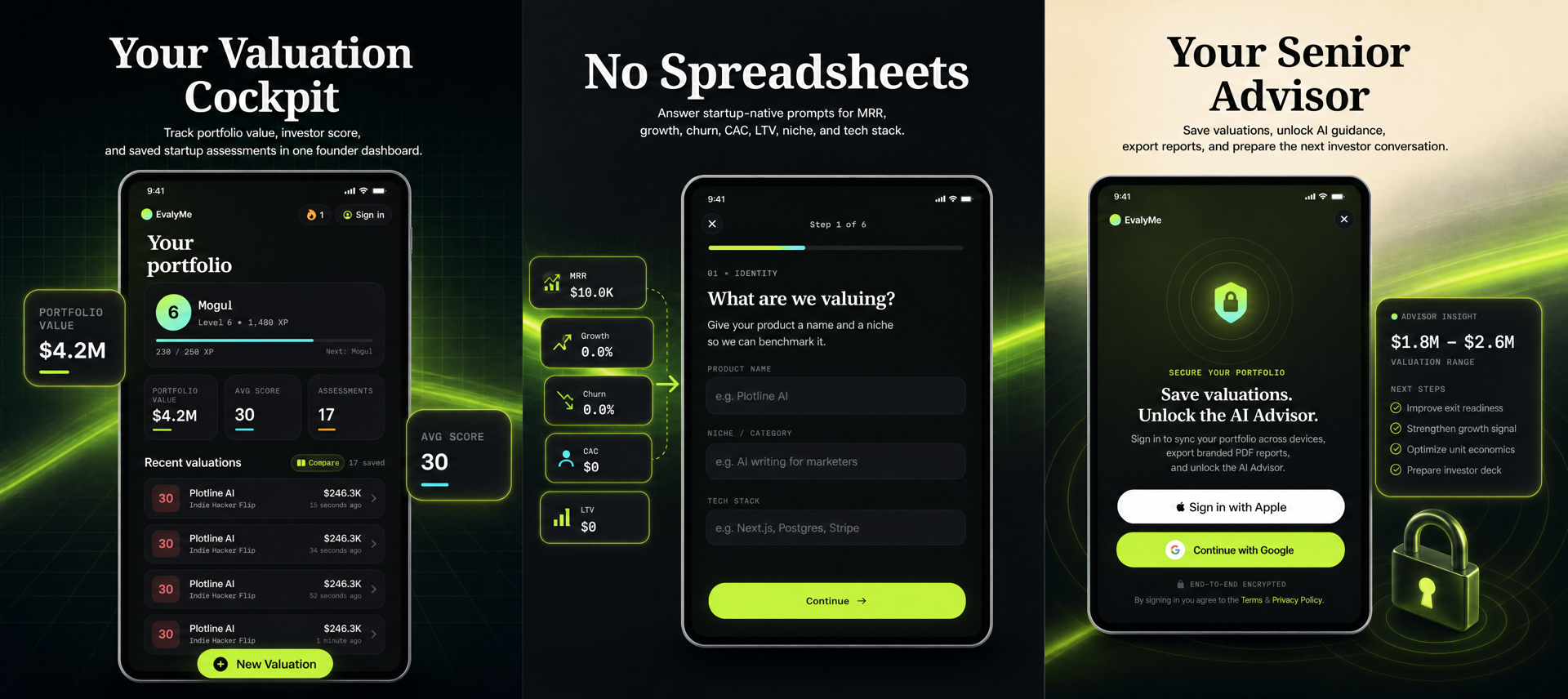
EvalyMe’s mobile apps follow the same core workflow as the web calculator, but are optimized for quick, on-the-go inputs. Here’s how a typical session works:
- Input your metrics: Enter your revenue model, monthly recurring revenue (MRR), active users, customer acquisition cost (CAC), customer lifetime value (LTV), monthly churn, monthly growth, and months in market. The app provides tooltips and sample values, but you should use your own up-to-date numbers for accuracy.
- Calculate your range: The app instantly produces a directional valuation range and a six-factor operating score. These are heuristic outputs—not a guarantee of price or buyer interest, but a way to compare scenarios and spot weak signals.
- Review drivers: The app breaks down what is helping or hurting your estimate. For example, high churn or low LTV/CAC will be flagged as areas to investigate.
- Save or share: With a free account, you can save your baseline, sync across devices, and share reports with co-founders or advisors. Pro features add playbooks and AI-driven guidance.
This workflow is designed for founders who need answers fast, without waiting for a desktop or a consultant. For a detailed look at the methodology behind these calculations, see EvalyMe’s published model.
Diagnostic Checklist: Inputs to Verify Before Using Any Valuation App
Before running a valuation estimate—especially on mobile—founders should double-check the following inputs:
- Revenue Model: Make sure you select the correct model (SaaS, Marketplace, Advertising, etc.) as this sets the base multiple.
- Monthly Recurring Revenue (MRR): Use normalized monthly revenue, not annual contracts or one-off payments. If you have annual subscriptions, divide by 12 to get the monthly equivalent.
- Active Users: Count only active, paying users (for SaaS) or the relevant cohort for your model.
- CAC and LTV: Use actual acquisition cost and customer lifetime value, not aspirational targets. If you’re unsure, estimate conservatively.
- Churn and Growth: Calculate churn as the percentage of customers lost per month, and growth as net new MRR or users per month.
- Months in Market: Enter the actual number of months your product has been live and generating revenue.
Mistakes in these areas can lead to misleading outputs. The app does not audit your contracts or financial health—garbage in, garbage out applies. For more input tips, see this practical SaaS valuation calculator guide.
Illustrative Example: Mobile SaaS Valuation in Action
Suppose you’re a solo founder with a SaaS tool for indie developers. Here’s how a mobile valuation session might look:
- Revenue model: SaaS Subscription
- MRR: $2,500
- Active users: 120
- CAC: $60
- LTV: $600
- Monthly churn: 6%
- Monthly growth: 3%
- Months in market: 14
Entering these into EvalyMe’s mobile app, you receive a heuristic valuation range (e.g., $140,000–$230,000 USD, for illustration only) and an operating score with breakdowns for revenue strength, retention, growth, and more. The app highlights that churn is the weakest signal, suggesting that improving retention could have a meaningful impact on your estimated range. You can then adjust churn to 4% in the app and immediately see how the valuation range shifts, helping you prioritize retention work over new feature development.
Understanding the Limits: What Mobile Valuation Apps Can and Cannot Do
Mobile valuation apps are scenario tools, not formal appraisals or buyer offers. They do not:
- Inspect your contracts, payment processor records, or customer support logs
- Access private acquisition data or current market multiples
- Guarantee that a buyer will pay the estimated range
- Substitute for due diligence, negotiation, or legal review
The operating score is a weighted summary of your inputs—not a multiplier or a defensibility rating. For example, a high score does not mean your business is acquisition-ready; it simply reflects the strength of your reported metrics within the model’s scope. Extreme or unverified inputs can distort the estimate, but the model caps certain factors to reduce this effect (see methodology).
Avoiding False Reads: Common Pitfalls and How to Spot Them
Founders often misinterpret valuation app outputs due to:
- Overstated MRR: Counting annual contracts as full monthly revenue, or including one-off payments. Always normalize annual subscriptions by dividing by 12.
- Ignoring cash collection: MRR is not the same as cash collected. Payment timing, Stripe’s definitions, and past-due invoices can all affect the numbers (see Stripe’s analytics docs).
- Aspirational inputs: Using target LTV/CAC or projected growth, rather than actuals.
- Misunderstanding the score: Treating the operating score as a valuation multiple or buyer guarantee.
To avoid these mistakes, use the app as a scenario tool: change one input at a time, see how the range moves, and focus on improving the weakest signals. Compare your metrics to your own historical cohorts, not to generic benchmarks.
Concrete Founder Actions: Making the Most of Mobile Valuation
- Run a baseline now: Use the EvalyMe mobile app or browser calculator to enter your current metrics. Save the baseline for reference.
- Scenario test: Adjust churn, growth, or CAC to see which changes have the biggest impact on your range and score.
- Prioritize work: Use the weakest signal from the operating score as your next 30-day focus. For example, if churn is hurting your estimate, prioritize onboarding improvements or win-back campaigns.
- Share with stakeholders: Use saved reports to communicate with co-founders, advisors, or potential buyers. This transparency helps set realistic expectations.
- Upgrade for planning: If you need continuity, task tracking, or tailored playbooks, consider EvalyMe Pro for ongoing exit-readiness and metric improvement.
When to Use Mobile, Web, or Both
Mobile apps are ideal for quick checks, scenario planning during travel, or capturing metric changes in real time. Use the web workspace for deeper dives, exporting reports, or collaborating with your team. All saved scenarios sync across devices, so you can start on mobile and continue on desktop as your planning needs evolve.
For founders who want to benchmark their metrics or prepare for a possible exit, mobile valuation is a fast, practical way to stay informed and focused on what actually moves the needle. For more on preparing for an exit, see The 90-Day SaaS Exit-Readiness Plan.
Next Steps and Methodology Reference
Ready to see where your SaaS stands? Try the EvalyMe free calculator in your browser or download the mobile app. Remember, the estimate is a directional planning tool—not a formal appraisal or buyer offer. For a full explanation of the model’s scope, limits, and formula, review the published methodology. Use your own metrics, compare scenarios, and focus on improving the weakest signals to make your business more valuable—on your terms.